
Often you may want to use Bash to find all files in a particular directory that have been created today.
You can use the following syntax to do so:
find . -daystart -ctime 0
This particular syntax will return all files in the current directory that have been created today.
Note that we use the -daystart flag to tell the find command to only find files that have been created today (i.e. since 12 AM) as opposed to the last 24 hours.
Note that you can also replace find . with find /some/directory/path to match all files in a specific directory that have been created today.
The following example shows how to use this syntax in practice.
Example: Find Files that Were Created Today in Bash
This article is currently being written on 7/29/2024.
Suppose we use the ls -l command to first view all files in our current directory along with their most recently modified time:
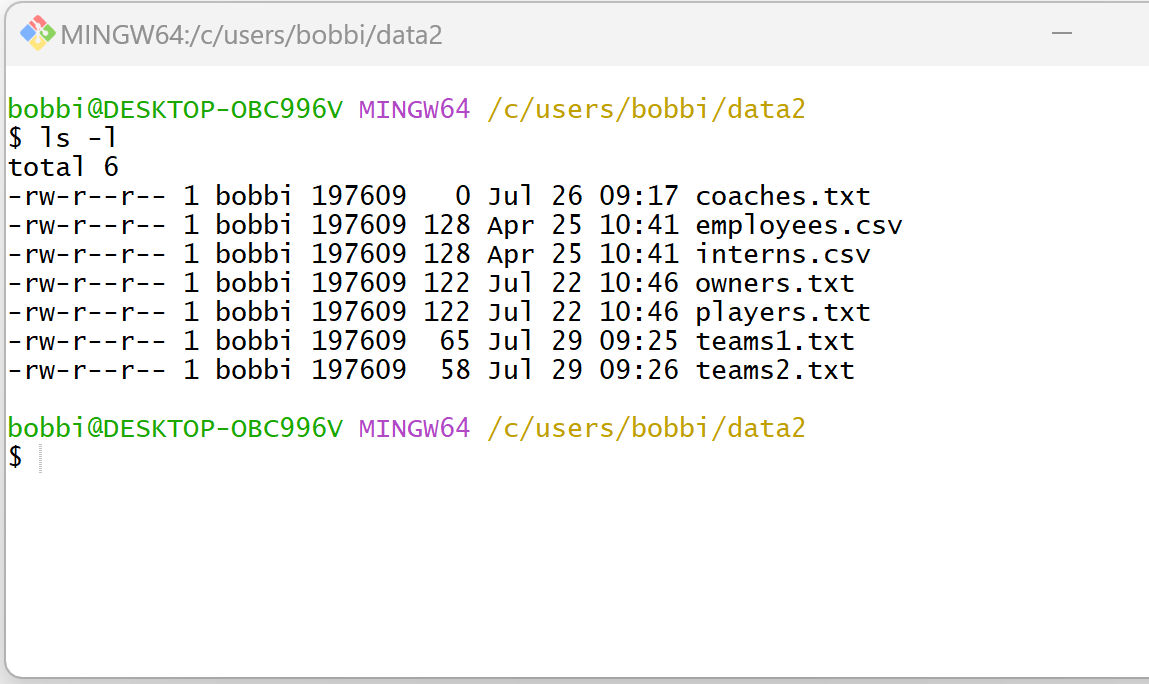
Now suppose that we would like to find only the files in this current directory that have been created today, i.e. on 7/29/2024.
We can use the following syntax to do so:
find . -daystart -ctime 0
The following screenshot shows how to use this syntax in practice:

Notice that this returns the following two files from the current directory:
- teams1.txt
- teams2.txt
We can view the output from the previous ls -l command to confirm that these two files have indeed been created today.
Note: The find command will actually return all files created or modified today since there is no explicit way to extract the creation datetime for a file.
Related Tutorials
The following tutorials explain how to perform other common tasks in Bash:
Bash: How to List All Files in Folder by Size
Bash: How to List All Files in Folder Without Extension
Bash: How to List All Files Matching a Specific Pattern
