
Often you may want to use Bash to count the number of characters in each line of a file.
You can use the following syntax to do so:
awk '{ print length }' teams.txt
This particular example will return the total number of characters in each line of the file named teams.txt.
Note: Spaces are counted as characters.
The following example shows how to use this syntax in practice.
Example: How to Count Number of Characters in Each Line of File in Bash
Suppose that we have a file named teams.txt in our current directory that contains the names of various basketball teams.
We can use the cat command to first view the contents of this file:
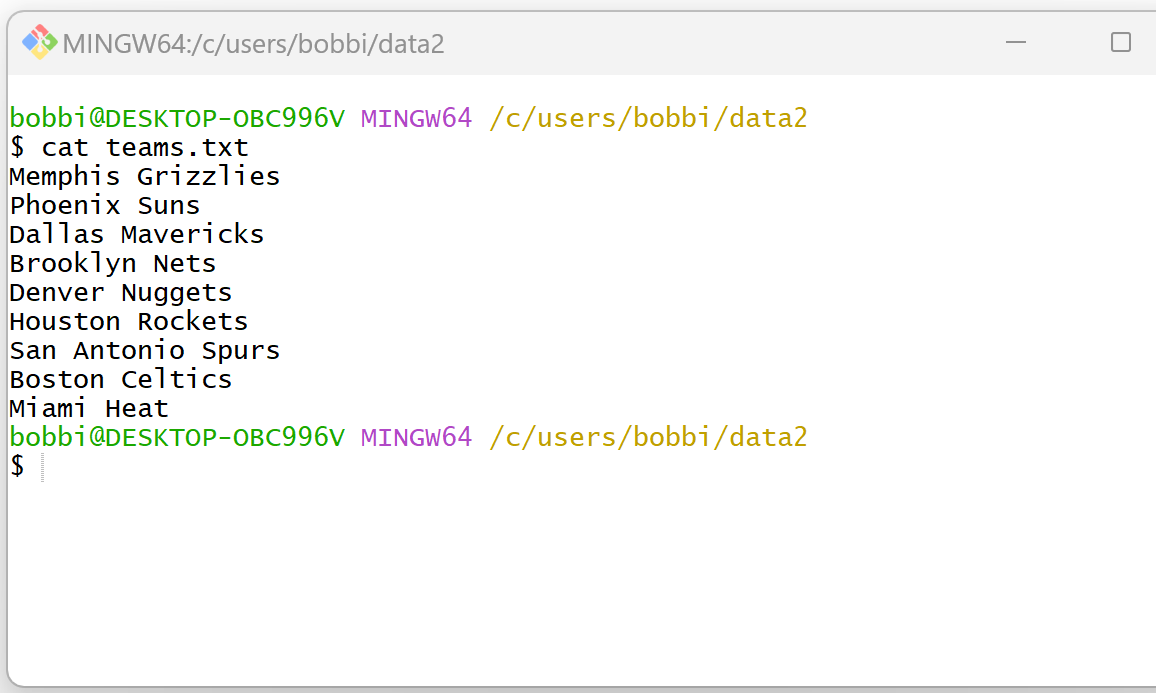
Now suppose that we would like to count the number of characters in each line of this file.
We can use the following syntax to do so:
awk '{ print length }' teams.txt
The following screenshot shows how to use this syntax in practice:

The output displays the number of characters in each line of the file.
For example, we can see:
- The first line (“Memphis Grizzlies”) contains 17 total characters.
- The second line (“Phoenix Suns”) contains 12 total characters.
- The third line (“Dallas Mavericks”) contains 16 total characters.
And so on.
Feel free to use similar syntax to count the total number of characters in each line of your own file.
Related Tutorials
The following tutorials explain how to perform other common tasks in Bash:
Bash: How to Count Number of Unique Lines in File
Bash: How to Count Number of Blank Lines in File
Bash: Count Number of Lines in Each File in Directory
